บทความ

app script doPost รับข้อมูลจาก diaglogflow

function doPost(e) {   var data = JSON.parse(e.postData.contents);   var intentName = data.queryResult.intent.displayName;      if (intentName === 'prodrug_inten') {     var productName = data.queryResult.parameters.product_entity;     var price = lookupPrice(productName);     var response = createResponse(productName, price);     return ContentService.createTextOutput(JSON.stringify(response)).setMimeType(ContentService.MimeType.JSON);   } else {     return ContentService.createTextOutput(JSON.stringify({       fulfillmentText: "ขออภัย ไม่สามารถประมวลผลคำขอนี้ได้"     })).setMimeType(ContentService.MimeType.JSON);   } } function lookupPrice(productName) {   // สมมติว่าเราใช้ Google Sheets เป็นฐานข้อมูล   var sheet = SpreadsheetApp.openById('1SFuy-_AAXFeDYxlWAGA-4Ls9pMWe4apWSfe2X3eQkfA').getSheetByName('productinfo');   var data = sheet.getDataRange().getValues();...
app script doPost รับข้อมูลจาก diaglogflow

  function doPost ( e ) { try { const body = JSON . parse ( e . postData . contents ); const queryResult = body . queryResult ; const outputContexts = queryResult . outputContexts ; let productEntity = '' ; // ค้นหา context ที่มีชื่อลงท้ายด้วย 'getprice-followup' const getPriceContext = outputContexts . find ( context => context . name . endsWith ( 'getprice-followup' )); if ( getPriceContext && getPriceContext . parameters ) { productEntity = getPriceContext . parameters . product_entity ; } // สร้าง response object const response = { fulfillmentText : `คุณเลือกผลิตภัณฑ์: ${ productEntity } ` }; // ส่งค่ากลับเป็น JSON return ContentService . createTextOutput ( JSON . stringify ( response )) . setMimeType ( ContentService . MimeType . JSON ); } catch ( error ) { // จัดการข้อผิดพลาด console . error ( 'Error in doPost:' , error ); return Co...

google app script เชื่อมต่อกับ diaglogflow

 function doPost(e) {   try {     const body = JSON.parse(e.postData.contents);     const queryResult = body.queryResult;     const outputContexts = queryResult.outputContexts;     let productEntity = '';     // ค้นหา context ที่มีชื่อลงท้ายด้วย 'getprice-followup'     const getPriceContext = outputContexts.find(context => context.name.endsWith('getprice-followup'));     if (getPriceContext && getPriceContext.parameters) {       productEntity = getPriceContext.parameters.product_entity;     }     // ค้นหาข้อมูลใน Google Sheets     const sheetName = "ชื่อ Sheet ของคุณ"; // แทนที่ด้วยชื่อ Sheet ที่ถูกต้อง     const sheet = SpreadsheetApp.getActiveSpreadsheet().getSheetByName(sheetName);     const data = sheet.getDataRange().getValues();     // ค้นหาแถวที่มี productEntity     const row = data.find(row => row[0] ==...

Backup and Restore Virtual Machines in Proxmox

 https://linuxhandbook.com/prxomox-backup-restore-vm/ cd /var/lib/vz/dump scp vzdump-qemu-100.xxxx.xxx.xxx.zst destination/dir

Installing Zabbix for HomeLab Monitoring

 https://cdn.zabbix.com/zabbix/appliances/stable/6.4/6.4.11/ https://homegrowntechie.com/installing-zabbix-for-homelab-monitoring/ wget https://cdn.zabbix.com/zabbix/appliances/stable/6.4/6.4.11/zabbix_appliance-6.4.11-qcow2.tar.gz tar -xvzf zabbix_appliance-6.4.11-qcow2.tar.gz qm importdisk 104  zabbix_appliance-6.4.11-qcow2/zabbix_appliance-6.4.11.qcow2  local-zfs

Rclone backup

rclone move /home/dexter/downloads/documents teamdrive: -P --tpslimit 9 --fast-list --delete-empty-src-dirs  

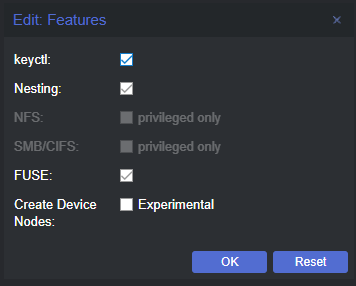
Proxmox: Run Docker on Linux Containers (LXC)

รูปภาพ
 https://benheater.com/proxmox-run-docker-on-linux-containers-lxc/ Preparing Proxmox   apt clean && apt update apt install -y fuse-overlayfs Install and Configure FUSE OverlayFS on the Linux Container apt clean && apt update apt install -y fuse-overlayfs ln -s /usr/bin/fuse-overlayfs /usr/local/bin/fuse-overlayfs